






Sales Tax Exemptions
We're updating how tax exemptions are submitted. For now, please follow the steps below and our customer care team will set up your exemption for you. Already have a tax-exempt account with us? No action is needed.
Step 1
If you’re new here, please Create an Account with us or Login to your existing account.
Step 2
Once you’re logged into your Account, follow the steps as mentioned below (or refer to the image included below)
-
Step 2a: Go to My Account
-
Step 2b: Click on Tax Certificates (left menu, bottom of page)
-
Step 2c: Click Add Exemption to start your Sales Tax Exemption submission.
*Important: Include your name in the Company/Institution Name field (e.g., ABC University, Attn: John/Jane Doe).
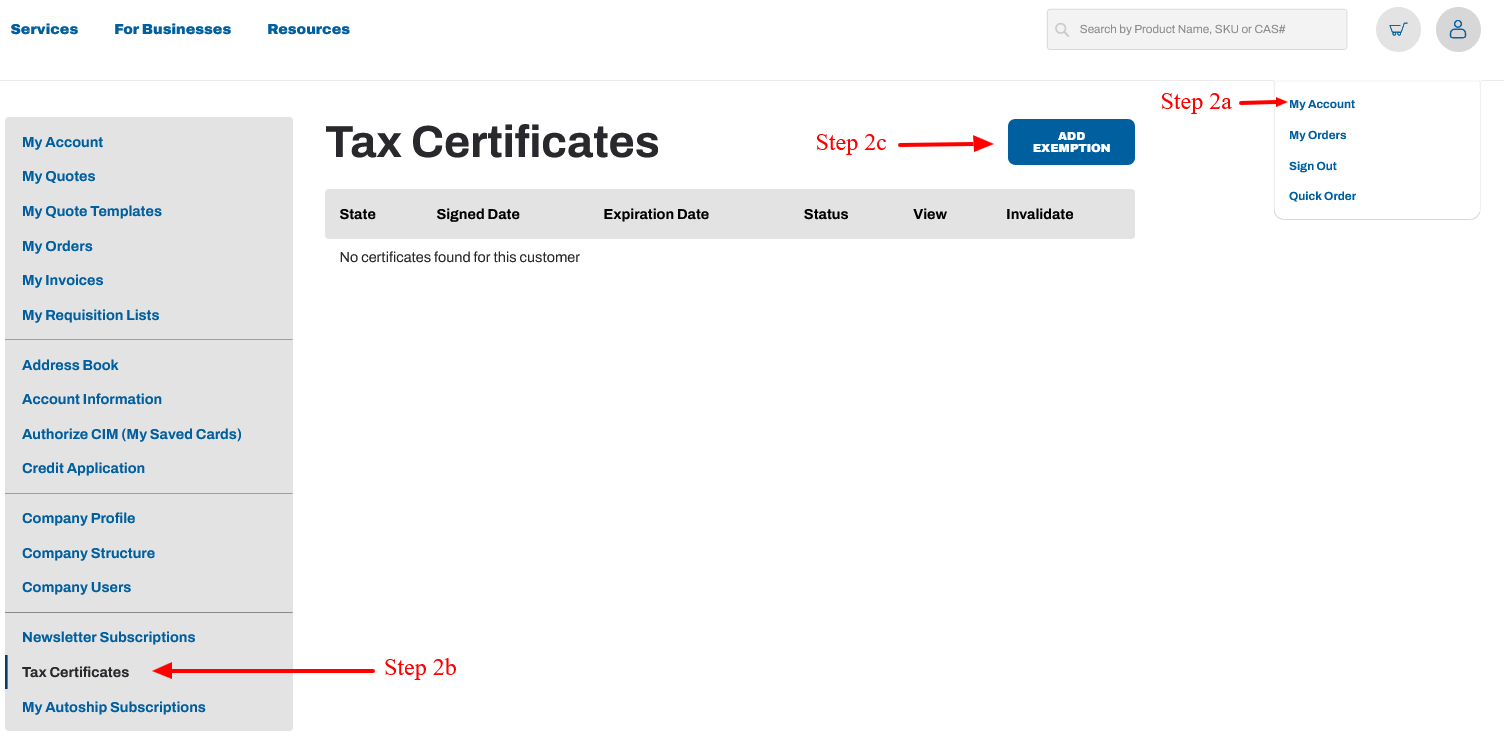
Step 2
Once your account is set up, email customercare@laballey.com with the subject line "Tax Exemption Request" and include:
- Company or institution name (as it appears on your account)
- Employee name
- Email address used on your account
- Exemption state(s)
- A copy of your state-issued sales tax exemption or resale certificate (attached)
Make sure your certificate:
- Is completed and signed
- Shows your organization's legal name or tax ID
- Is current (not expired)
- Covers each state you're ordering to — attach one per state if needed
We can't accept IRS 501(c)(3) determination letters, W-9s, or business licenses on their own — these don't exempt you from sales tax. If you're a nonprofit, most states require a separate state-issued exemption certificate.
We'll set up your exemption and email you within 1 business day.
Please wait for our confirmation email before placing your order so sales tax isn't charged. Need to order today? Call customer care at 512-668-9918.
Step 3
Avalara will review your exemption request and notify you via email on your approval status. You may also visit your online account under Tax Certificates to check your status. Once approved, you can place tax-free orders online.